AI Doesn’t Understand Your Users. It Understands Nouns.
Before you read, just be clear that we use:
- AI: Artificial Intelligence
- IA: Information Architecture
so now we can start…
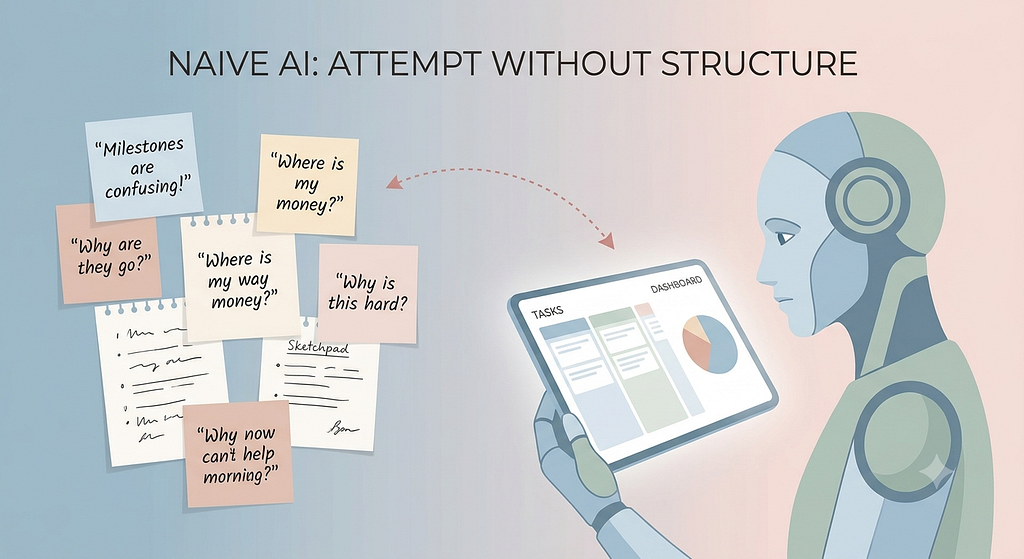
If you’ve ever dumped user interview notes into an AI tool and asked it to “design a dashboard,” you already know what happens. You get a sleek interface with a sidebar, three arbitrary buttons, and a calendar widget — a polished UI that somehow manages to make no sense at all.
That’s because raw research is messy. It’s full of human stories, emotions, tangents, and informal language. Software, on the other hand — and the AI models generating it — operates strictly on structured logic and entity relationships.
If we don’t bridge that gap, the AI just fills the vacuum with generic design tropes. This is where Information Architecture (IA) and Object-Oriented UX (OOUX) come in. They aren’t just legacy design methods; they are the structural Rosetta Stone that turns human mental models into something an AI can actually reason about.
The Alignment Chain: Three Blocks That Can’t Wobble
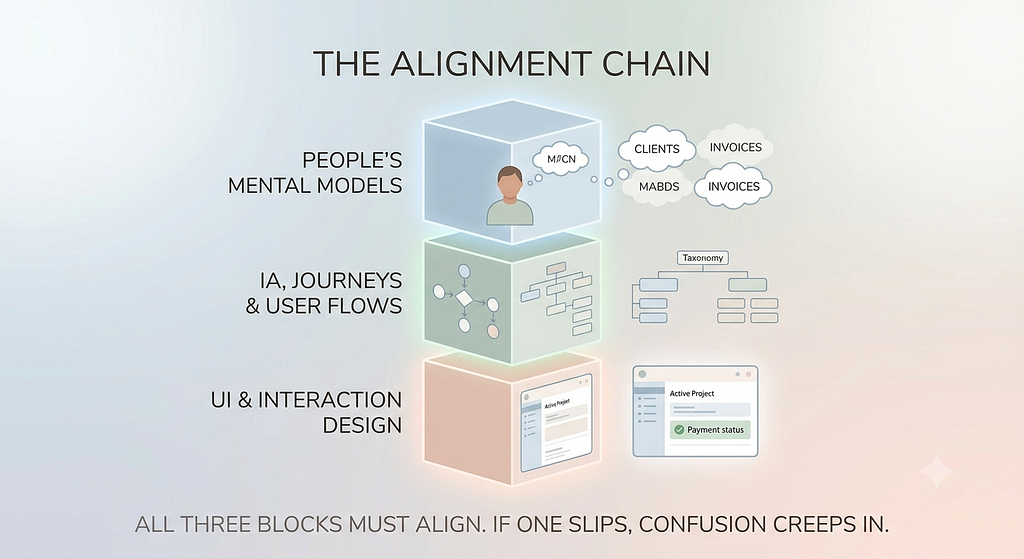
To build software that feels intuitive, every concept in your product has to maintain alignment across three distinct layers:
┌─────────────────────────────────────────────────────────┐
│              1. PEOPLE'S MENTAL MODELS                  │
│       How users naturally perceive domain concepts      │
└────────────────────────────┬────────────────────────────┘
                             │  Must Align
                             ▼
┌─────────────────────────────────────────────────────────┐
│            2. IA, JOURNEYS & USER FLOWS                 │
│         OOUX, taxonomy, and step sequences              │
└────────────────────────────┬────────────────────────────┘
                             │  Must Align
                             ▼
┌─────────────────────────────────────────────────────────┐
│               3. UI & INTERACTION DESIGN                │
│    Visual components, button placement, and feedback    │
└────────────────────────────┴────────────────────────────┘
When all three align, software feels invisible. It just works. But the second one of those blocks slips out of place, confusion creeps in instantly:
- If the Mental Model doesn’t match the IA: A user thinks of their work as an “Event,” but the system forces them through a folder-based file structure. They feel lost before they even hit the main workspace.
- If the Information Architecture (IA) doesn’t match the UI: The journey map says a “Task” lives inside a “Project,” but the UI renders “Tasks” as a random standalone list. The user loses their sense of orientation.
- If the AI is guessing the middle layer: You end up with a Frankenstein UI — pretty components floating around without any shared logic, consistent vocabulary, or clear relationships.
Step 1: Speak in Nouns Before You Pick Verbs (OOUX)
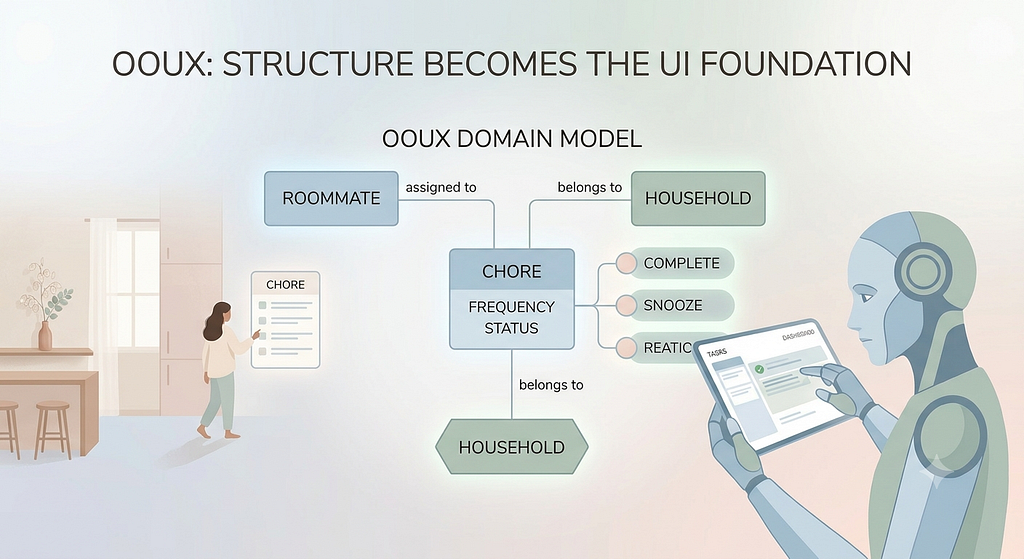
Human brains don’t think in screens or user flows. We think in objects. When you walk into a hospital, you think about Patients, Doctors, Appointments, and Prescriptions. You don’t think in “Step 1 of the booking modal.”
Sophia Prater introduced Object-Oriented UX to help teams anchor products around these real-world entities (nouns) before jumping straight into actions (verbs) or even worst “features” (what even features mean really for a product? , Sophia shares in one episode of her podcast).
Coincidentally, Large Language Models (LLMs) operate on entity relationships at their core. When you hand an AI an explicit domain model — defining core Objects, their Attributes, their Relationships, and their Calls-to-Action — you stop it from guessing.
Instead of telling an AI a generic:
“Create an app for managing household chores.”
You tell it:
“Create an app for managing household chores. In our domain, a ‘Chore’ is assigned to one ‘Roommate’, belongs to a ‘Household’, and has a ‘Frequency’ attribute. A Roommate can ‘Complete’ or ‘Snooze’ a Chore.”
Suddenly, the AI stops throwing random UI widgets at the wall. It starts constructing a system that matches how people actually live, think and behave.
Step 2: Set the Spatial Rules and Dialect (IA & Journeys)
If OOUX gives you the core entities, Information Architecture gives them a map and a dictionary. IA grounds your AI across three critical areas:
- Nomenclature: Enforcing exact vocabulary so the AI doesn’t call an item a “Draft” on one screen and an “Unsaved Document” on the next.
- Taxonomy: Setting clear rules on how objects live together (e.g., “A Workspace contains Projects, and Projects contain Assets — never the other way around”).
- Journeys & Navigation: Defining how users move between entities based on their actual goals, preventing deep, nested menus that obscure key tasks.
The Rule of Maximum Context: Stacking Research + OOUX + IA
A common mistake is assuming you have to replace raw user research with structured frameworks when prompting AI. In reality, generative AI thrives on maximum context.
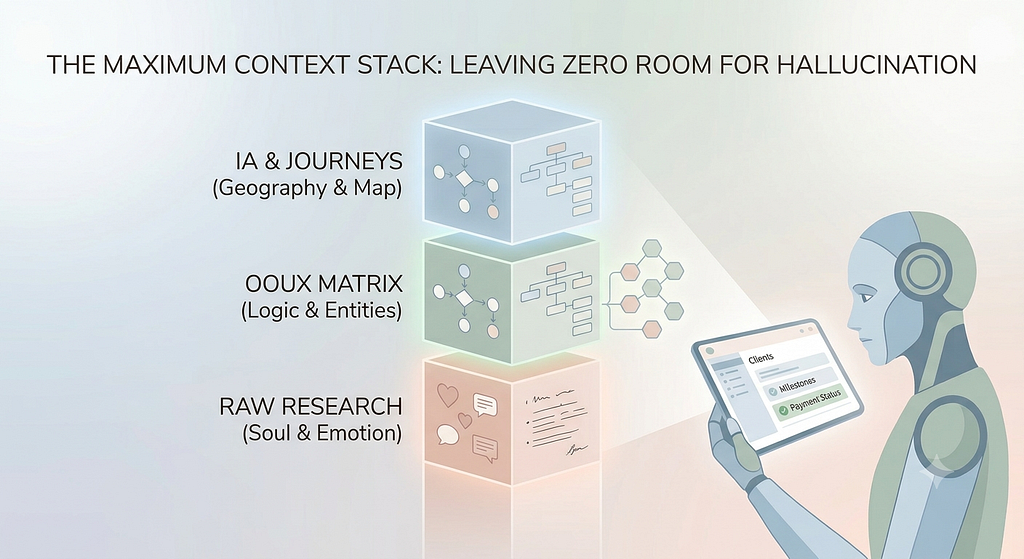
If you give an AI model only raw research, it lacks structural logic. If you give it only an OOUX matrix, it lacks human nuance and emotional intent. But when you feed your AI the complete stack — Research + OOUX + IA — you give it a bulletproof foundation:
┌────────────────────────────────────────────────────────┐
│                   THE CONTEXT STACK                    │
├────────────────────────────────────────────────────────┤
│ 1. RAW RESEARCH  ➔ The Soul & Sentiment (Why)          │
│ 2. OOUX MATRIX   ➔ The Logic & Domain Entities (What)  │
│ 3. IA & JOURNEYS ➔ The Geography & Vocabulary (How)    │
└────────────────────────────────────────────────────────┘
When you stack all three into your system prompt or context window, you leave zero room for the AI to hallucinate or fall back on generic patterns.
Putting It Into Practice: A Real-World Example
To see how this works in practice, let’s walk through what happens when building a freelancer management tool with AI — first without a full context stack, and then with one.
1. The Naive AI Attempt (Research Only)
If you paste raw user interview quotes like “I just want to know if my Client paid for the Milestone before sending final files” directly into an AI UI generator with the prompt “Design a portal based on this,” here is what usually happens:
- The Confusion: The AI generates a generic Kanban board labeled “Tasks,” a side menu labeled “Documents,” and a pie chart showing “Project Velocity.”
- Why it failed: The building blocks collapsed. The user’s mental model is built around Clients, Milestones, and Invoices. The AI defaulted to generic software patterns (Tasks, Folders, Dashboards).
2. The Maximum Context Stack (Research + OOUX + IA)
Instead of feeding only raw research, you structure the full context stack for the AI:
[ LAYER 1: USER RESEARCH CONTEXT ]
User Pain Point: "I lose track of payments. I don't care about generic tasks—I need to know if a Client paid a Milestone before releasing work."

[ LAYER 2: OOUX DOMAIN MODEL ]
• Core Objects: Client, Milestone, Invoice.
• Relationships: 1 Client HAS MANY Projects ➔ 1 Project HAS MANY Milestones ➔ 1 Milestone HAS 1 Invoice.
• Attributes: Milestone (Status: Draft/Pending Approval/Completed), Invoice (Status: Unpaid/Paid).

[ LAYER 3: IA & NOMENCLATURE RULES ]
• Vocabulary: Always use "Client" (never "Customer") and "Milestone" (never "Task").
• Taxonomy: Invoices live directly inside Milestones; Milestones live inside Projects.
• Flow Intent: Client Profile ➔ Active Project ➔ Unpaid Milestone ➔ Trigger "Release Files" CTA when Invoice status = Paid.
3. The Aligned AI Output
When you feed this complete stack into your AI generator, the output changes dramatically:
- The primary navigation centers strictly around Clients and Invoices rather than generic folders.
- Clicking into a Client reveals a card listing their Milestones and the direct Payment Status tied to each deliverable.
- The action button on an unpaid milestone clearly says “Send Invoice Reminder” instead of a generic “Edit Item.”
Because the mental model, domain objects, IA taxonomy, and user sentiment were all provided in context, the resulting interface feels like a natural extension of the freelancer’s mind — zero confusion required.
The Takeaway
AI is an incredible generator, but a terrible mind reader. It can output screen layouts in milliseconds, but it has no idea how your users see the world unless you teach it.
By stacking Research + OOUX + Journeys into your AI prompts, you ensure every block in your system — from the user’s mental model down to the button click — stays firmly aligned. That’s how you move from generating random screens or even services (yes, not everything could be delivered in a screen) to building software and processes that speaks your user’s language natively.
Fredy Pascal
Principal Service & UX Designer
Ciao ciao
How this piece came to life (my HAIH Process):
✍️ Human First: Pouring raw ideas and unique perspectives into the initial draft.
🤖 AI Enhanced: Cleaning up grammar and sharpening the overall flow.
🎨 AI Image Generation: Crafting custom visuals to bring the concepts to life.
👀 Human Last: The final human touch — rigorous review and verification before hitting “publish.”
AI Doesn’t Understand Your Users. It Understands Nouns. was originally published in Bootcamp on Medium, where people are continuing the conversation by highlighting and responding to this story.