Designing for Expertise: A Framework for Knowledge-Centered Design
Designing for Expertise: A Framework for Knowledge-Centred Design

With the vast amount of information available today through tools like Google, Gemini, and ChatGPT, a key challenge in designing user experiences is managing knowledge to reduce frustration and ensure successful task completion.
The core of this challenge lies in knowledge-based support, which is the level of information and confidence a user has about a specific domain. The more time a user spends on a topic, the more their knowledge and confidence grow, enabling them to handle complex tasks more efficiently. This mastery is crucial for managing tasks and improving communication.
To design effectively, you must first map out the knowledge landscape of your domain or user journey. Ask these critical questions:
User Knowledge
- What information do users need to know to complete the task?
- What information might users be missing?
Required Knowledge
- What information are we asking users to provide during their journey?
- Which pieces of information are mandatory, and which can be skipped?
Supported Knowledge
- What information can we provide to users based on what we already know?
- What external information can we retrieve to support them?
The goal of this mapping is to reduce the user’s cognitive load when start designing and create a seamless experience.
How to Gather This Information
The most effective way to validate your knowledge map is through direct engagement. Talk to and observe people. Conduct interviews with both internal stakeholders (colleagues, providers) and external ones (users, competitors). From these conversations, you can extract and refine the information for your list, ensuring it is comprehensive and reliable.
Knowledge-Oriented Design
Once you have your knowledge map, you can begin designing. The rule is simple: you must design to all four knowledge archetypes simultaneously.
As you design each phase of a user journey, ensure that all four archetypes are supported. Users should feel empowered by their knowledge level and have the freedom to switch between modes.
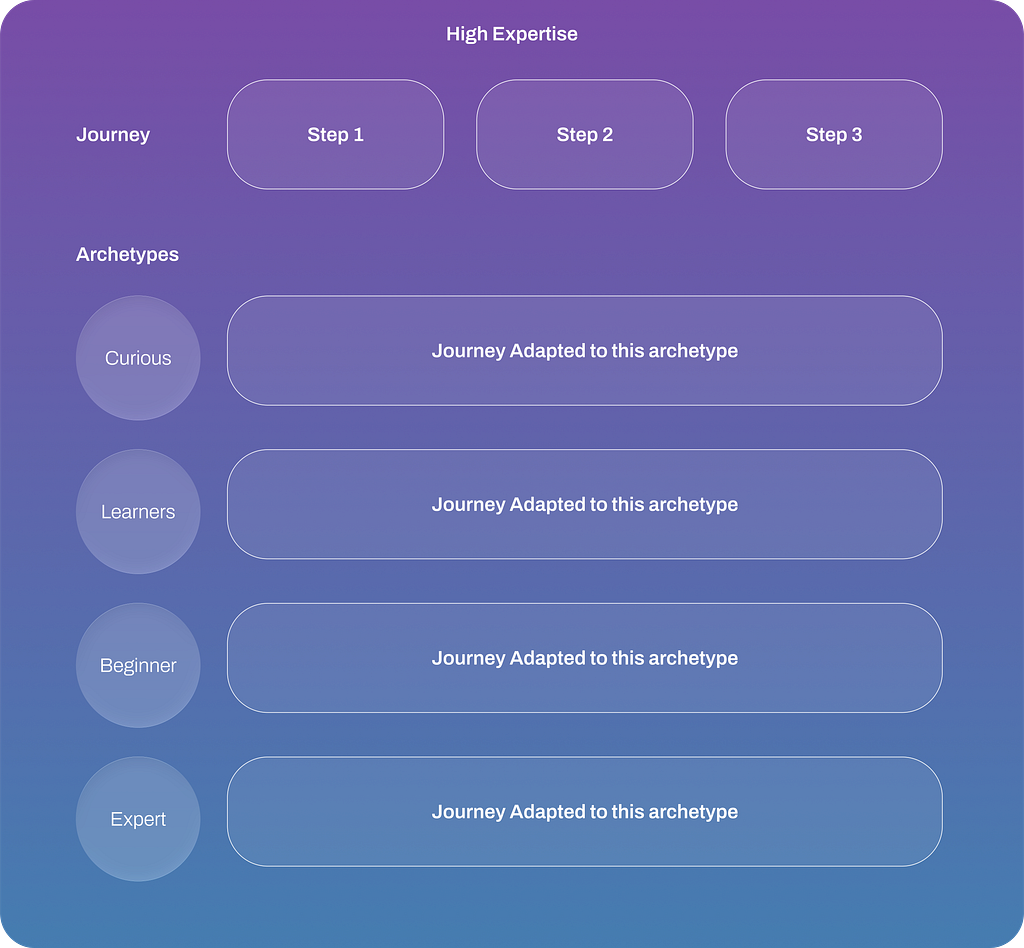
For example, consider an app for mental health:
- A beginner who feels lost and doesn’t know what to do needs guided support. A good solution would be an AI Coach that provides step-by-step guidance, prompts them to journal, or connects them with a professional in a crisis.
- An expert who has been in therapy for years and wants to resume sessions needs efficiency. The ideal solution is to allow them to quickly filter and select a therapist based on their preferences and book an appointment directly.
Both solutions can coexist within the same product, giving users the option to start with the AI Coach or jump straight to booking. If the design only offers a general AI Coach solution, expert users will be frustrated by the need to navigate a funnel just to book a simple appointment.
This approach ensures that your design is inclusive and adaptable, meeting users where they are in their knowledge journey.
The 4 types of Archetypes
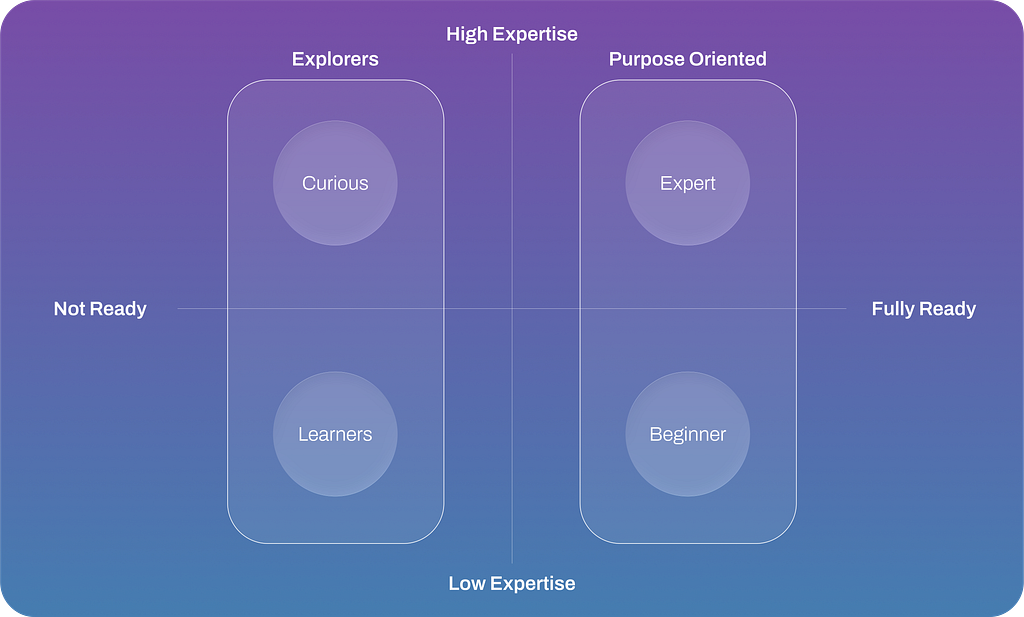
The Explorers:
Looking for Options (Divergence)
1. The Learner
- Primary Need: To understand the basics and build confidence without feeling overwhelmed. They are just starting their journey and don’t know what to do yet.
- Design Principle:
Provide a Gentle On-ramp. Your design should educate and nurture. This means offering structured guidance, clear explanations, tutorials, and a forgiving environment where mistakes are not critical. The initial experience should prioritize clarity over comprehensive features. - Knowledge Level: Very Low
2. The Curious
- Primary Need: To discover and compare a wide range of possibilities. These users are knowledgeable but are in a divergent, open-ended phase. They are not ready to commit and want to see all their options.
- Design Principle:
Create an Open Sandbox. Your design should inspire and empower exploration. This involves providing powerful search, filter, and comparison tools, flexible navigation, and ways to save or organize findings (like favorites or mood boards). Avoid forcing them down a linear path or not come back actions. - Knowledge Level: Medium
The Purpose Orienter:
Looking for Completion (Intent oriented)
3. The Beginner Purpose Orienter
- Primary Need: To take action and achieve a successful outcome quickly and easily. They are motivated to act now but lack the knowledge to make complex decisions. They need clear direction.
- Design Principle:
Offer a Golden Path. Your design must guide them toward a successful outcome. This means providing strong recommendations, clear calls-to-action (CTAs), simple choices, and step-by-step instructions. Reduce complexity to prevent decision paralysis. - Knowledge Level: Low to Medium
4. The Expert Purpose Orienter
- Primary Need: To complete their known goal with maximum speed and efficiency. As experts, they know exactly what they want to do and value control and productivity above all else.
- Design Principle:
Design an Express Lane. Your design should accelerate their workflow. This involves offering shortcuts, advanced features, customization options, and streamlined processes that allow them to bypass introductory steps and work without friction with high level of personalization - Knowledge Level: Very High
A well-designed product should cater to both explorers and experts. Instead of choosing one over the other, the focus should be on creating an experience that accommodates both user types.
Designing from Explorers to Experts
A designer’s challenge is to balance the needs of different user groups. Here’s how you can shift your mindset and design for both:
1. Start with a beginner-friendly core.
For explorers, the initial experience should be simple and intuitive. This means providing clear guidance, tooltips, and a logical flow that doesn’t overwhelm them with too many options. Use progressive disclosure to reveal more complex features as users become more familiar with the product.
2. Offer advanced features for experts.
Experts need speed and efficiency. Provide shortcuts, keyboard commands, and a powerful search function that allows them to bypass the basic interface. Offer customization options so they can tailor the product to their specific workflow. Remember, what a beginner finds helpful, an expert might find frustrating.
3. Create a seamless transition.
The key is to build a bridge between the two modes of interaction. As explorers gain confidence and experience, the design should gracefully guide them toward becoming experts. This can be achieved through tutorials, “power-user” tips, and a clear path to accessing more advanced features. This approach ensures that the product grows with the user, making it valuable for the long term.
So what…
Knowledge-centered design is more crucial than ever, as we must carefully consider the inputs systems use to make decisions and help users complete tasks. This requires a fundamental redesign of workflows based on the user’s and the company’s knowledge base. We must reinvent entire user journeys to achieve a holistic goal supporting all type of archetypes.
Ciao ciao,
Fredy Pascal
Principal Service Designer
https://fredypascal.figma.site/

Designing for Expertise: A Framework for Knowledge-Centered Design was originally published in Bootcamp on Medium, where people are continuing the conversation by highlighting and responding to this story.